top of page
IMG_3565.JPG

Check Out Our Latest Designs

Subscribe and be the first to know about our latest card making designs!

Hi friends!  Today’s card is my take on Jen’s weekly Altenew Challenge Live from 30 June 2026 (Creative Challenge #58).  The challenge is to “create a project that features the magic of the evening sky, i.e., stars, constellations, fireworks, and lightshows, etc.”.  I have a certain Altenew stamp set that I haven’t used in a few years that I want to utilize on this project, but other than that I’m flying blind!  Let’s see how this turns out.


The supplies used:

     Altenew – To The Moon Stamp Set

     Altenew – Whispers in the Canopy Stamp Set

     Altenew – Masking Paper

     Altenew – Obsidian Pigment Ink Pad

     Simon Says Stamp – Pawsitively Saturated Ink Pads:  Flax, Wheat, Fawn

     Ranger Ink/Tim Holtz – Distress Ink Pads:  Crushed Olive, Evergreen

          Bough, Broken China, Faded Jeans, Uncharted Mariner, Black Soot

     Spellbinders – Raven Cardstock

     Waffle Flower – Background Blender Brushes

     Ranger Ink – Glossy Accents

     Altenew – 1” x 1/16” Black Instant Dimension Foam Tape

     Bearly Art Precision Craft Glue


Creating the Background

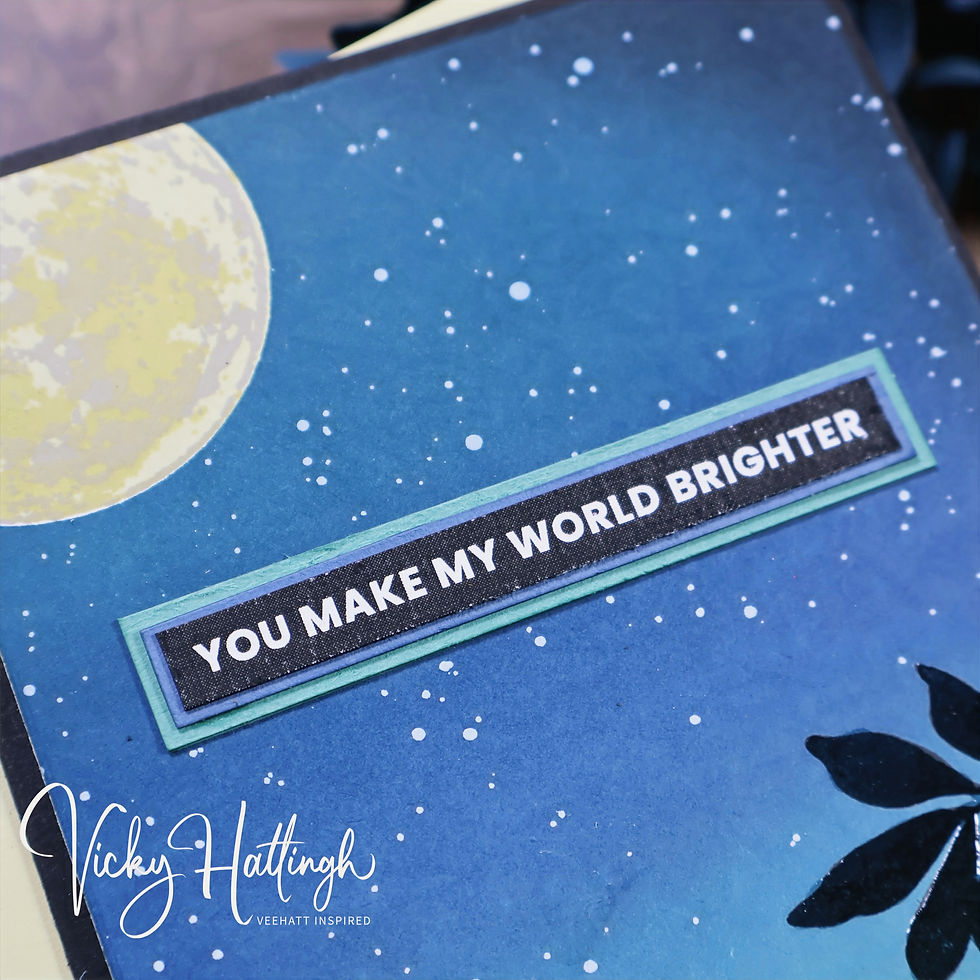
For the background panel, I started out with a white piece of cardstock that measured 5” x 7” (it will be trimmed later to measure 4.5” x 6.25”).  I placed it in my Altenew Stampwheel 2.0 and placed the solid circle stamp from the Altenew To The Moon stamp set on the upper left corner of my cardstock to start stamping the three layers for the moon.  The inks I used were Simon Says Stamp’s Flax for the first moon layer, Wheat for the second layer, and Fawn for the third layer.  I stamped the solid circle stamp a second time onto a piece of Altenew’s Masking Paper since I will mask off the moon before I ink blend the night sky.  I fussy cut the circle image from the masking paper, removed the backing paper from the mask, and applied it over the moon stamped onto the white cardstock.


Next, I selected the ink pad colors I will use for my night sky.  I decided to go with a rather unusual blend (for me anyway) and decided to use the Ranger/Tim Holtz Distress Ink Pads for the ink blending and the colors were:  Crushed Olive, Evergreen Bough, Broken China, Faded Jeans, Uncharted Mariner, and Black Soot.  I used the Waffle Flower Background Blender brushes for my background ink blending and started with Crushed Olive to work my way up from the bottom left corner of the cardstock until I reached my final color of Black Soot.  For my silhouette image at the bottom of the card, I chose to use the Altenew Whispers in the Canopy stamp set and stamped the large foliage stamp so that it draped over the bottom, right corner of my card front using Altenew Obsidian pigment ink.  I mixed a few drops of water with a dab of the Altenew Titanium White Artists’ gouache and spattered it across the background panel with a small paint brush making sure to try and not get too much of it on the silhouette.  After the gouache dried, I carefully removed the mask from the moon.  Lastly, I applied a thin coat of Ranger’s Glossy Accents to the silhouette leaves to add some depth to what is essentially all but a one-layer card.


Creating the Sentiment

For the sentiment, I chose to use one the Altenew Printable Sentiment Strips that says, “You Make My World Brighter”.  I swiped the Distress Ink Faded Jeans ink pad across a scrap piece of white cardstock and did the same with the Evergreen Bough ink pad on another scrap of white cardstock.  I added liquid glue to the back side of the sentiment strip and adhered it to the Faded Jeans cardstock and trimmed around the sentiment to give it a thin mat, then stacked the sentiment on top of the Evergreen Bough cardstock and trimmed around it to create a thin mat.


Assembling the Card

I cut a piece of Spellbinders Raven cardstock to measure 9” x 6.25” and scored it down to middle on the long side at 4.5” – this created my A6, side folding card base.  I trimmed the inky background to measure 4” x 6” and added strips of Altenew Black Instant Dimension Foam Tape in the 1” size to the back side of the background panel.  After removed the adhesive backing, I adhered the background to the center of the card base.  With that… this card is completed!


Thank you for stopping by and checking out today’s blog post, I really appreciate it.  Until next time, happy crafting!


Hi friends!  Today’s card is my take on Jen’s weekly Altenew Challenge Live for 16 June 2026 (Creative Challenge #56).  The challenge is to “create a project that embraces repetition as a design element”.  I have the products in mind that I want to use for this challenge, now let me see if I can pull it off successfully!


The supplies used:

     Altenew – Bubbly Bumble Bee Layering Die Set

     Altenew – Making Moments Press Plate

     Altenew – One-Go: Solid Sentiment Banners Press Plate & Die

     Spellbinders – Precision Layering A2 A Die Set

     Spellbinders – Merlot Colorwheel Cardstock

     Gina K. Designs –Black Onyx Cardstock

     My Favorite Things – Butterscotch Cardstock

     Tsukineko – VersaFine Clair Nocturne Ink Pad

     Tonic Studios – Vintage White Vellum Paper

     Altenew – Ultra Stick Double Sided Tape, 1”

     Altenew – ¼” x 1/16” Black Instant Dimension Foam Tape

     Bearly Art Precision Craft Glue

     Spellbinders – BetterPress System

     Anna Griffin Empress Die Cutting Machine


Creating the Background Panel

For the background panel, I used the largest die from the Spellbinders Precision Layering A2 A die set to die cut a piece of Gina K. Designs Black Onyx cardstock and the second largest die to die cut a piece of Spellbinders’ Merlot cardstock.  This gave me a black matting layer with a dark red background for the bees I'll be using for my repetition element.  Using the Altenew Making Moments Press Plate and my Spellbinders BetterPress system, I added VersaFine Clair Nocturne ink to the press plate and applied the impression to the Merlot cardstock panel.


Creating the Decorative Elements

For the bumble bees, I used Altenew’s “Bubbly Bumble Bee” layering die set.  I die cut the layers for the bee from Gina K. Designs Black Onyx cardstock, Tonic Studios’ Vintage White Vellum Paper, and My Favorite Things’ Butterscotch cardstock.  Once the die cutting was completed, I used Bearly Art glue to adhere the layers together (the design required 11 completed bees).  After the glue dried, I positioned the bees onto the A2 size card front and tried to mix up their positioning, so all the bees weren’t facing the same direction or in the identical orientation.  Once happy with their layout, I adhered them to the Merlot cardstock panel with liquid glue.


Creating the Sentiment

For the sentiment, I chose the “Wishing You a Great Day!” sentiment banner from Altenew’s One-Go: Solid Sentiment Banners Press Plate set.  I used the Spellbinders BetterPress system and the VersaFine Clair Nocturne ink pad and pressed the sentiment banner onto a piece of white cardstock.  After allowing the ink to dry approximately 30 seconds, I used the coordinating Altenew die to die cut all the sentiment banners.


Assembling the Card

To assemble the card, I added strips of Altenew’s 1” Ultra Sticky Double-Sided Tape to the back side of the card front with the bees on it and adhered the panel to the black matting layer.  I also added the double-sided tape to the back side of the matting layer and adhered it to an A2, side folding, Butterscotch colored card base.  Next, I added pieces of Altenew’s 1/4” wide, black Instant Dimension Foam Tape to the back side of the sentiment banner that required support and adhered it to the card front.


Thank you for stopping by and checking out today’s blog post, I really appreciate it.  Until next time, happy crafting!


Hi friends!  Today’s card will be the fourth installment in my 2026 Holiday Card Series where I am attempting to have my holiday cards mostly completed before mid-November.  I’ve created with elements from this Tim Holtz/Sizzix die set before, but this time I wanted to try using it in more of the traditional sense.


The supplies used:

     Sizzix/Tim Holtz – Vault Christmas Magic

     Simon Says Stamp – Cozy Christmas Stamp Set

     Concord & 9th – Festive Phrases Stamp Set

     American Crafts Cardstock – Christmas Textured Cardstock

     Simon Says Stamp – So Very Black Cardstock

     Simon Says Stamp – Black Glossy Cardstock

     Copic – Sketch Alcohol Markers Y08, R39, R29, R24, B97, B95, B91,

          G28, G24, G21, E74, C7, W9

     Tsukineko - Memento Black Dual Marker

     Lawn Fawn – Jet Black Ink Pad

     Simon Says Stamp – Pawsitively Saturated Ink Pads – Sky, Dusk & Night

     Tsukineko – VersaFine Claire Nocture Ink Pad

     Iuile Watercolors – Silver Watercolor Paint Pan

     Ranger Ink – Glossy Accents

     Posca Silver Pen PC-1MR

     Altenew – Masking Paper

     Bearly Art Precision Craft Glue

     Scrapbook Adhesives – Thin 3D Foam Squares

     Picket Fence Studios – Candy Cane Gem Embellishment Mix

     My Sweet Petunia – Original MISTI Stamping Tool

     Anna Griffin Empress Die Cutting Machine


Creating the Background

For the background, I took a piece Altenew’s Masking Paper and die cut it using the cityscape die from the Sizzix Vault Christmas Magic.  Next, I trimmed a piece of white cardstock to measure 4.5” x 6.25” and used a pencil and a t-square ruler to draw a line across the bottom of the panel (portrait orientation) 2.25” from the bottom edge of the cardstock.  I removed the adhesive backing from the cityscape mask and adhered the bottom edge of the mask along the top of the pencil line.  Using Simon Says Stamp ink pads, I began ink blending with Sky ink starting at the top of the buildings and continued blending the night sky with Dusk and Night inks until the entire sky area was ink blended.  Before removing the cityscape mask, I added a light spattering of Iuile Watercolors’ Silver watercolor paint across the sky for my stars.  I carefully removed the mask and set the panel aside to completely dry.


Creating the Focal Points

Using the Sizzix/Tim Holtz Vault Christmas Magic die set, I die cut the dies from the following cardstocks:


     City Scape:  American Crafts Cardstock – Christmas Textured Collection – Dark Grey

     Santa & Reindeer:  Simon Says Stamp – So Very Black Cardstock

     Lamp Post:  Simon Says Stamp – Black Glossy Cardstock

     Wreath & Bow:  Green and Red Scraps from my Scrap Bin


I used liquid glue to adhere the cityscape die cut along the top of the pencil line drawn onto the lower portion of the background panel and added the Santa/reindeer die cut above the buildings in the sky.  I used a pair of scissors to the trim off the excess reindeer that extended outside the card panel.  Next, I used the Y08 Copic Sketch alcohol marker to fill in the window openings on the buildings.


Then, using the Simon Says Stamp Cozy Christmas stamp set, I stamped the two vehicles, Christmas tree, and evergreen tree (twice) with Lawn Fawn’s Jet Black ink onto X-Press It blending cardstock.  I colored the images using Copic Sketch alcohol markers in these colors:


     Red Car:  R39, R29, R24, W9 (tires), C7 (windows), Posca Silver Pen

          on wheels and bumper trim – R29, B97, B95, B91 (gift)

     Blue Car:  B97, B95, B91, W9 (tires), C7 (windows), Posca Silver Pen

          on wheels and bumper trim – G28, G24, G21, E74 (tree)

     Trees:  G28, G24, G21 and the lights were dotted using the same Sketch markers

          I used on other elements listed above


Once the images were colored, I fussy cut them and used a black Memento marker to cover the white edges of the trimmed images.  I added Ranger’s Glossy Accents to the windows of both vehicles and to the Christmas tree lights just for fun.


Creating the Sentiment

For the sentiment, I used the Concord & 9th Festive Phrases stamp set’s “have a merry Christmas” greeting and stamped it on the lower center portion of the card front using VersaFine Clair Nocturne Black ink.


Assembling the Card

I used liquid glue to adhere the two regular trees and the red card to the card front, then used Thin 3D Foam Squares to adhere the blue card and the decorated Christmas tree.   Using my paper trimmer, I cut a scrap piece of green and red cardstocks to measure 5” x 1/8” and glued those below the cityscape die cut on the card front and trimmed off the excess with scissors.  Lastly, I added a sprinkling of Picket Fence Studios’ Candy Cane gem embellishments around the sentiment and adhered the card front to a white, side folding, A6 card base.


Thank you for stopping by and checking out today’s blog post, I really appreciate it.  Until next time, happy crafting!


Life is full of inspiration and experiences

Follow us on Instagram

  • Instagram
Subscribe to our Mailing List

Thanks for submitting!

  • Instagram

© 2025 by VeeHatt Inspired. Privacy Policy. All Rights Reserved.

bottom of page